
Reference

CLI options

daemonitor-cli is the standalone terminal monitor. It shares the desktop app’s core runtime, SQLite database, and retention settings.

brew tap cdsap/tap
brew install daemonitor-cli
daemonitor-cli --help

Also available as daemonitor-cli-*.zip on GitHub Releases (requires JDK 21).

Flags

Option What it does
-h, --help Print usage and exit.
-v, --version Print the Daemonitor version and exit.
--plain Disable colors and terminal screen clearing. Prefer this when redirecting output or using a limited terminal.
--no-color Alias for --plain.
--collect-only Collect and persist samples without rendering the live table. Useful for background collection.
--db PATH Use this SQLite database file instead of the default app data location.
--poll-interval SECONDS How often to poll processes. Default: 2.
--retention DAYS How long to retain history (1–90 days). Matches the desktop Settings retention window.

Everyday usage

  • Press q to quit the interactive monitor.
  • Over SSH, allocate a TTY: ssh -t host daemonitor-cli.
  • First-poll CPU shows sampling placeholders until a delta exists; 0% means idle afterward.
  • Live heap shows n/a for wrappers and test workers; daemons are probed when Attach/JMX succeeds.
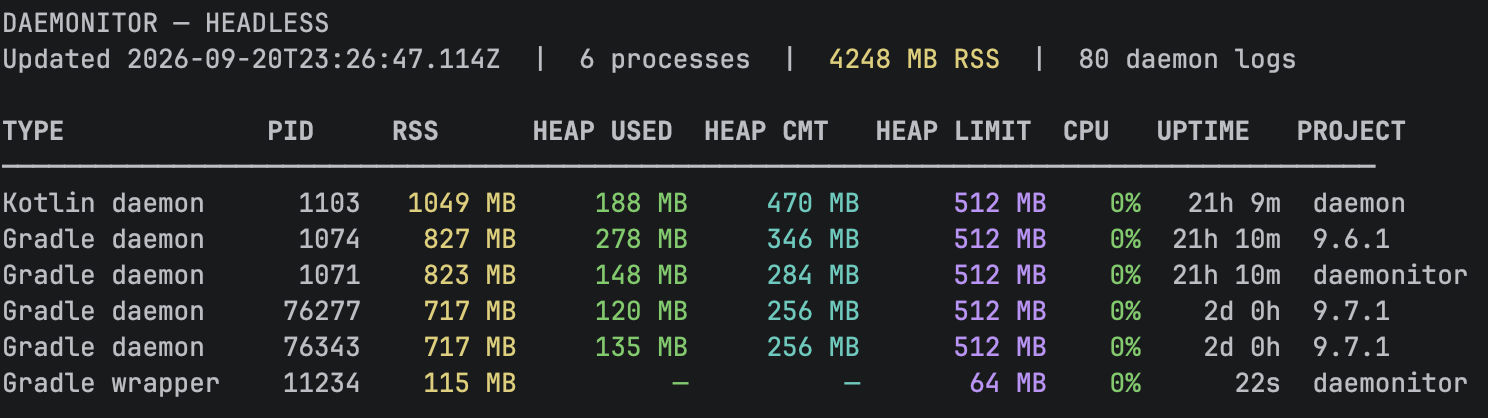
Daemonitor CLI terminal showing live Gradle-related processes with RSS, heap, CPU, and uptime

Back to CLI overview · Home